

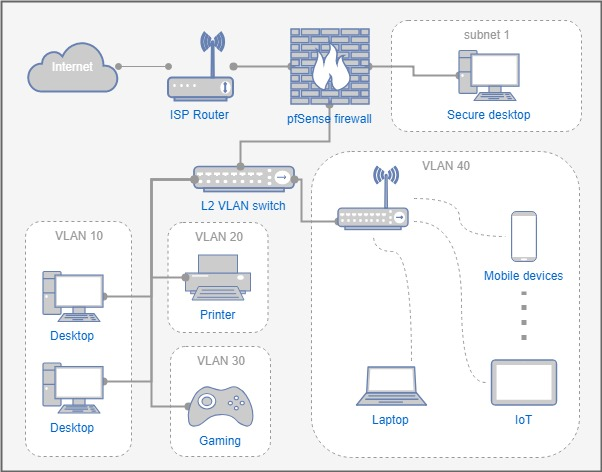
A VLAN, or Virtual Local Area Network, is basically a way to divide a single physical network (like the switches and cables in your office or shipyard) into multiple “virtual” networks. Think of it like creating separate rooms in a big open warehouse—everyone’s in the same building, but each room has its own privacy and rules.


(Captions: Simple topology diagrams showing multiple VLANs (e.g., Admin, Guest, IoT) on a single switch—perfect for visualizing separation in a shipyard or office setup.)
Why use VLANs? They improve security, organization, and efficiency. For example, isolate boat monitoring systems from office computers.
How Does a VLAN Work?
VLANs work by tagging network traffic with identifiers (IEEE 802.1Q standard), so switches know which virtual network packets belong to.


(Captions: Diagrams of the 802.1Q VLAN tag added to Ethernet frames—shows exactly how the “tag” is inserted.)
Key concepts:
- Access Ports: For end devices (untagged traffic).
- Trunk Ports: Carry multiple VLANs (tagged traffic) between switches.


(Captions: Great illustrations comparing tagged vs. untagged ports and trunk vs. access setups—super helpful for understanding isolation.)
How to Set Up a VLAN: Step-by-Step Guide
On a managed switch (like Cisco or TP-Link):
- Access the web interface.
- Create VLANs (assign IDs).
- Assign ports (access/trunk).
- Test!


(Captions: Screenshots from Cisco switch interfaces showing VLAN creation and port assignment—makes the steps feel real.)
In my setup, these visuals would’ve saved me time troubleshooting trunks!
Pro tip: Start small, test pings between devices.
Got your own VLAN war stories? Comment below. Stay wired, folks! ⚡🌐